gouge
Formatters for the Python logging module. gouge gives console output
a uniform, coloured layout that is easy to scan, and writes the same
records as JSON Lines, CSV or XML for machines. It works with the standard
library alone: no wrapper API, no new logger class. Its only dependency is
colorama.
Install
$ pip install gouge
gouge needs Python 3.11 or newer.
Example
Set up the root logger with
Simple.basicConfig, then log
as usual:
>>> import logging
>>> from gouge.colourcli import Simple
>>> handlers = Simple.basicConfig(
...     level=logging.DEBUG
... )
>>> log = logging.getLogger("app")
>>> log.info("Server started")
2026-10-27 13:34:48,899 INFO       [app] Server started
>>> log.warning("Disk 91% full")
2026-10-27 13:34:48,899 WARNING    [app] Disk 91% full
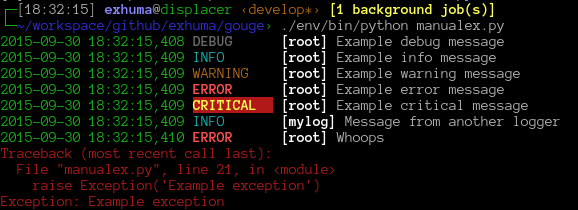
On a terminal, the level, logger name and tracebacks are coloured:
Features
- Readable console output
Simplealigns the level names, colours each level, puts the logger name in brackets and colours tracebacks, with file names of your own code highlighted.- Configuration files
Every option works from
logging.config.dictConfig()and YAML files, including pre-formatters given as dotted paths. No subclass is needed.- Extra attributes
Attributes passed with
extra={...}or set by a filter, such as a correlation ID, are appended askey=valuepairs withshow_extra.- Structured output
JSONLogwrites one JSON object per line, extra attributes and OpenTelemetry trace IDs included.CSVLogandXMLLogwrite CSV and XML.- uvicorn support
capture_uvicorn()routes uvicorn’s records through your handlers, anduvicorn_access()colours its access log.- Colour control
NO_COLORandFORCE_COLORare honoured. Without them, colour is stripped when the output is not a terminal.- Level shifting
ShiftingFilterraises or lowers the level of records from a noisy library.
Project status
gouge is actively maintained and stable (Development Status “Production/Stable”). The API has been stable since 2.0. See Compatibility for the versioning and deprecation policy.
Compatibility
gouge follows Semantic Versioning.
It supports the CPython versions which have not reached their end of life
(see endoflife.date), currently 3.11 to
3.15, the versions in requires-python and the package classifiers. When
a Python version reaches its end of life, the next minor release may raise
the minimum version.
A change is breaking when it can make working user code fail or behave differently. This includes:
removing or renaming a public name, parameter or attribute,
changing the layout of a formatter’s output, such as the order of its fields or the names of its keys,
raising an exception where the code did not raise before,
changing a return type.
Breaking changes are released only in a major version. Before gouge removes
anything, a minor release deprecates it: the old name emits a
DeprecationWarning, and the Changelog names the
replacement. The removal comes no earlier than the next major release.
Contents
- Console output
Console output with
Simpleand its options.- Configuration files
Configure gouge with
logging.config.dictConfig()or a YAML file.- Pre-formatters
Rewrite the messages of a logger before they are formatted.
- Extra attributes and correlation IDs
Show extra attributes and correlation IDs.
- Structured output
Write JSON Lines, CSV or XML.
- Running under uvicorn
Format uvicorn’s server and access logs.
- Controlling colour
Switch colour on or off.
- Shifting log levels
Change the level of records from a library.
- API reference
Every public module, class and function.
- Changelog
Changes in every release.